Design your next big idea

Say the idea. See the app.

Chat about what you want to build. SnapUI designs the screens, lets you tap through them, changes anything you ask in plain words, and hands a full build spec to your coding agent.

  • Free to start
  • No design or code skills needed

Pick an idea

Real apps

The playback needs JavaScript. Below is what SnapUI designed for the first idea.

Hotel guest app is ready

Ready Playing
  1. BrainstormHotel guest app
  2. Blueprint5 pages
  3. Screens5 of 5
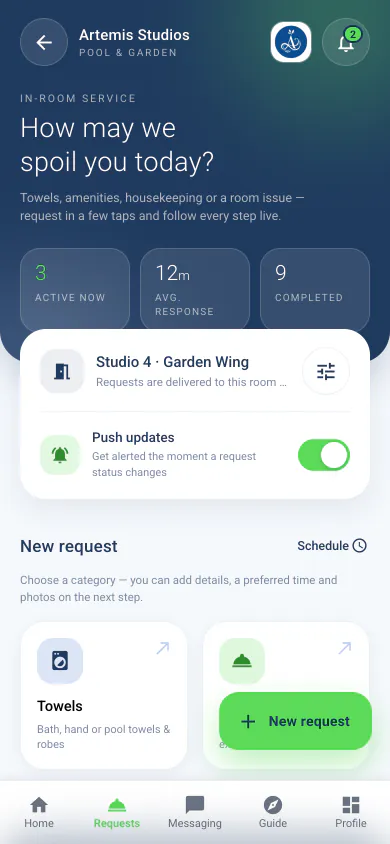
Artemis Studios Pool and Garden: the Home/Dashboard screen

Tap through it

Blueprint

Ready
Artemis Studios Pool and Garden

Colours

  • Primary#5DDA59
  • Secondary#BFCFEF
  • Accent#1F3A5F

Font

Aa
RobotoLight, Regular, Medium and Bold

Pages5 pages · start on Home/Dashboard

  • 01Home/DashboardStart
  • 02In-Room Service Requests
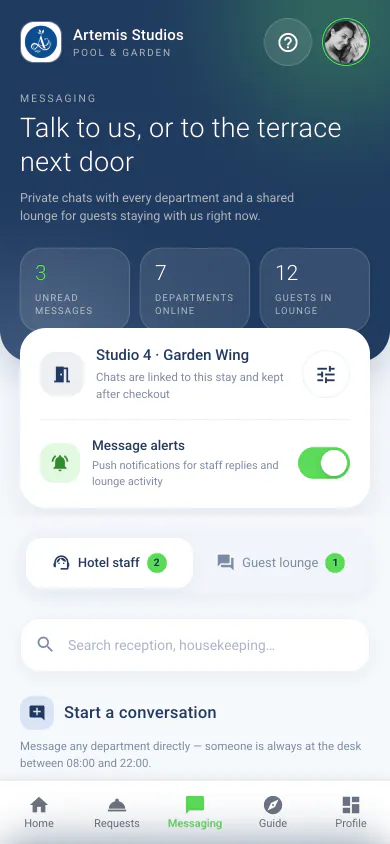
  • 03Messaging
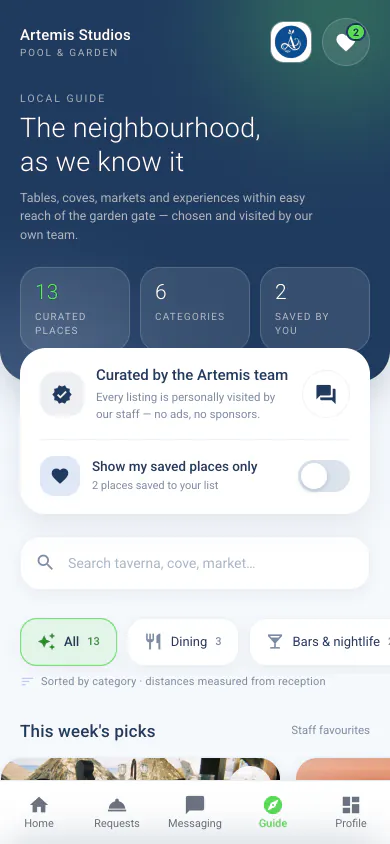
  • 04Local Guide
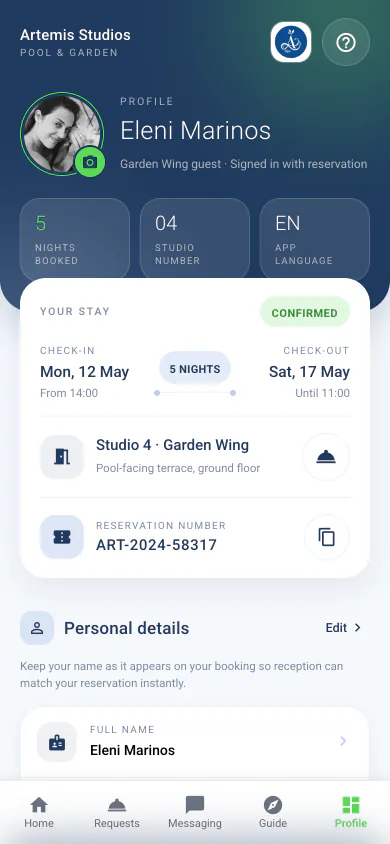
  • 05Profile Management

The canvas

Five screens, all linked.

Every page the app needs, wired the way you tap through it. These are the real pages of Artemis Studios Pool and Garden; pick one to see where it leads.

Artemis Studios Pool and Garden5 pages

5 tabsShare
  1. 01Home/DashboardStart390 × 844

    Artemis Studios Pool and Garden: the Home/Dashboard screen
    • In-Room Service Requests · Room Service
    • Local Guide · Local Guide
  2. 02In-Room Service Requests

    Artemis Studios Pool and Garden: the In-Room Service Requests screen
    • Messaging · Staff chat
  3. 03Messaging

    Artemis Studios Pool and Garden: the Messaging screen
    • Local Guide · Guide tab
  4. 04Local Guide

    Artemis Studios Pool and Garden: the Local Guide screen
    • Profile Management · Profile tab
    • Messaging · Message the concierge
  5. 05Profile Management

    Artemis Studios Pool and Garden: the Profile Management screen

Home/Dashboard · the app opens here · links to In-Room Service Requests, Local Guide

Pick a page

How it works

From a chat to a build
spec, in five steps.

No design tools to learn and no code to write. You talk, SnapUI designs, you decide what stays.

  1. Brainstorm

    Chat it through. SnapUI asks what a designer would: who it’s for, the feel, the must-haves.

  2. Blueprint

    A name, colours, a font, and every page the app needs.

  3. Screens

    Real, tappable screens you preview on your own phone, bottom bar and all.

  4. Revise

    Say what to change. Keep it or undo it. Every version is kept.

  5. Share & export

    A link anyone can open, store images, or a build spec for your coding agent.

Demo

Pick an idea.
Watch it get designed.

A guided demo. Every screen here was designed by SnapUI ahead of time; in the app, it designs yours from your own words.

BBrainstorm

How a brainstorm goes.

An example conversation for Artemis Studios Pool and Garden. SnapUI asks what a designer would; here, you just tap an answer.

Brainstorm

A guest app for a small hotel

  • Guest app
  • New chat
Example conversation

A guest app for our pool and garden studios on Naxos. Guests should see their stay, ask for towels or a repair, message us, and find good places nearby.

SnapUI: Lovely. Should guests sign in first, or look around as visitors before they arrive?

Visitors too. Let people look around before they book.

SnapUI: Got it: visitors see the weather, the studios and the local guide; signing in unlocks their stay, requests and chat. I’ll design 5 screens, starting with the home dashboard.

CREATE APP

Tap an answer

CRevise

Change anything in plain words.

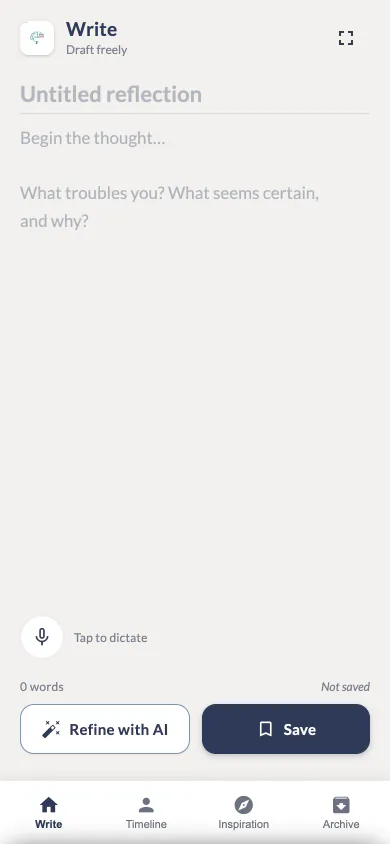
A real edit to the Write screen of MindArchive. Edits run in the background; you review each one, keep it or undo it, and every version stays in the page’s history.

The changeReplays this edit
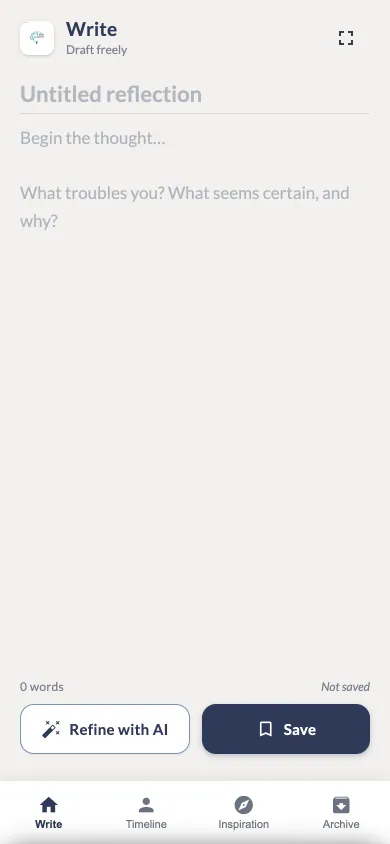
v1Before
MindArchive: Write, version 1, before the change
v2After
MindArchive: Write, version 2, after the change: add voice dictation

Review this change

v1v2

DScreens that think

AI that works inside
your prototype.

MindArchive has AI built into its screens, and it really works when you preview it in the SnapUI app. Pick a feature to see where it lives and what it does.

Pick a feature

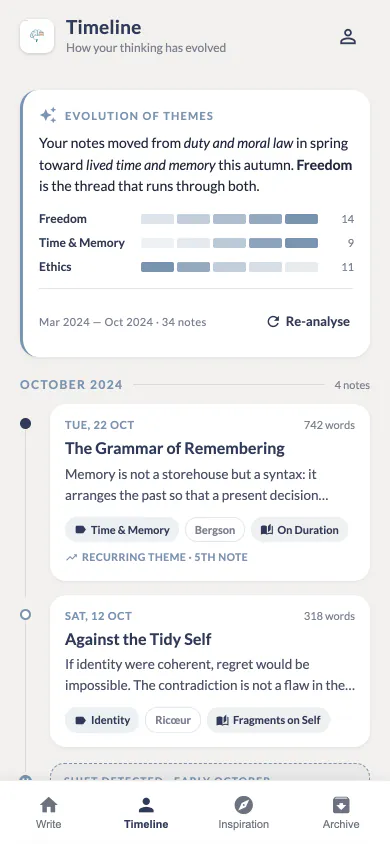
In the appRewrites a note for clarity and style while keeping your voice and meaning. Nothing changes until you accept it, and saving can suggest philosophers who speak to the note.

MindArchive: the Write screen, where refine with ai lives

Voice works in the app

Export

Hand it to a
coding agent.

When the screens feel right, export a build spec your coding agent can follow from the first phase to the last, or take the screens just as they are.

mindarchive.zipCLAUDE.mdready for your coding agent
  • mindarchive.zip
    • READ_ME.txt
    • CLAUDE.md
    • PHASES.md
    • logo.png
    • screens/
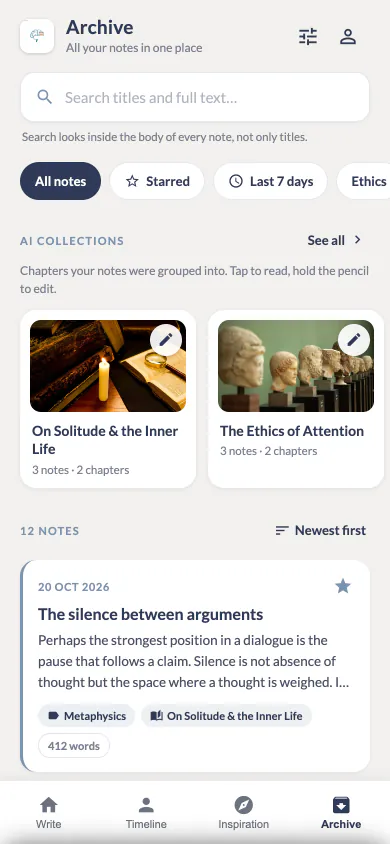
      • 01-write.html
      • 02-notes.html
      • 03-library.html
      • 04-timeline.html
      • 05-profile.html
      • 06-collections.html
      • 07-login.html
    • screenshots/
# MindArchive — build specification

## What it is
Write, refine and organize philosophical notes with AI.

## Design system
- Primary colour:   #2E3A59
- Secondary colour: #F2F1EF
- Accent colour:    #7A93AE
- Font family:      Lato
- App icon:         `logo.png`

## Navigation
The app opens on **Write**.
**Bottom navigation bar**, in order:
- **Write** → Write
- **Timeline** → Timeline
- **Inspiration** → Library
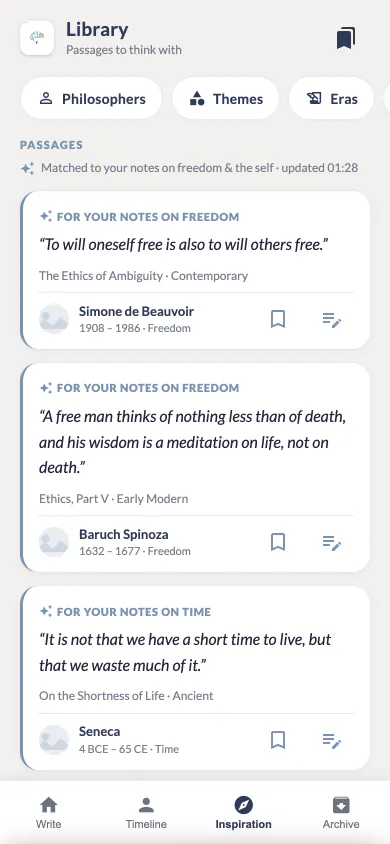
- **Archive** → Notes

## Screens 7, from 01-write.html
  • Export for Claude Code

    Build spec

    A zip with CLAUDE.md (what the app is, the design system, every screen and the navigation), a phased build plan, and the approved HTML and a screenshot of every screen, ready for your coding agent.

  • Export files

    The screens as they are, ready to open, keep or pass along.

  • Mirror to GitHub

    Keep each app in its own private repository.

  • Store images

    Sized for Google Play and the App Store, made from your screens.

Your projects

Your projects,
everywhere.

Sign in with Google or GitHub. Your apps, pages, every revision and your brainstorm chats back up to your account and come back on a new phone.

  • Projects

    MindArchive7 pages · 4 tabs

    Artemis Studios5 pages · 5 tabs

  • Brainstorm

    MindArchiveBrainstorm chats

    Artemis StudiosBrainstorm chats

  • Exports

    mindarchive.zipExport for Claude Code

    Mirror to GitHubPrivate repository

    Store imagesGoogle Play · App Store

  • Profile

    Signed in with Googleor with GitHub

    Backed upApps, pages, revisions, chats

    New phone?Sign in and it all comes back

Pricing

Free to start.
SnapUI Pro when
you want more.

Start with a welcome credit that never expires. When you want more, subscribe to SnapUI Pro for monthly credits, or buy a credit pack.

SnapUI

Free to start

  • A welcome credit when you sign up. It never expires.
  • Brainstorm, get a blueprint and have real, tappable screens designed
  • Revise them in plain words and keep every version
  • No design or code skills needed

SnapUI Pro

Optional subscription

  • Monthly credits, renewed every billing cycle
  • For when you design often, or for clients
  • Everything in the free plan, with more room to explore
  • Managed and cancelled in your Google Play account
SnapUI

Design your next big idea.

Design your own UI.

Coming soon toGoogle Play

Coming soon to theApp Store

SnapUI is coming to Google Play, and the iPhone version is in progress.

Questions, ideas or feedback about SnapUI? Send a message and we will reply by email.

Your message goes straight to the SnapUI team. We use your email only to reply.